The platform that
runs your installations
One system for the whole installation lifecycle: order intake, installer matching, scheduling, customer communication, quotes, and invoicing. It's built on 20,000+ completed installations and works in any country. In Sweden, it also files the grid pre-notification automatically.
Trusted by







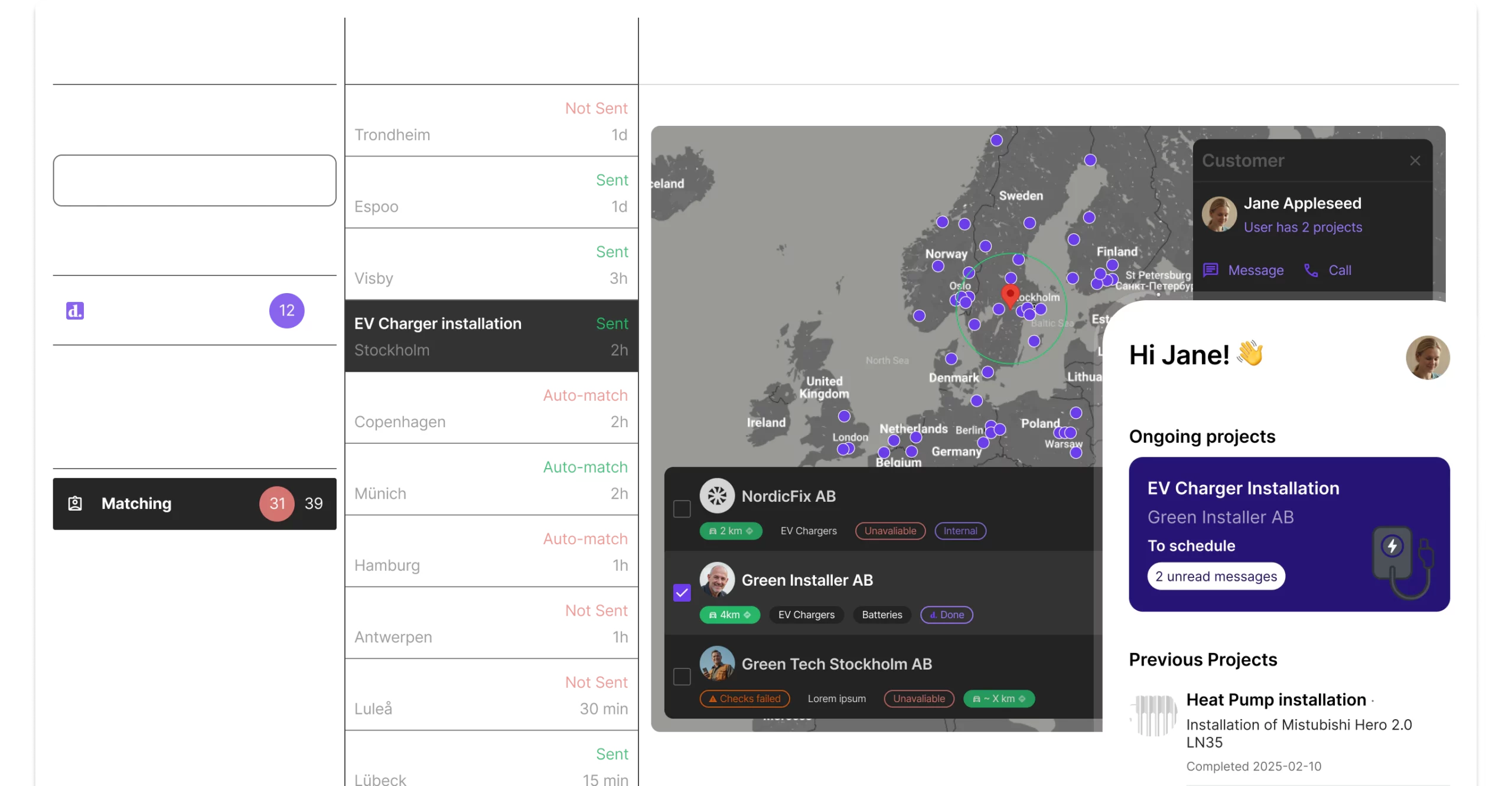
See every installation's status in one place
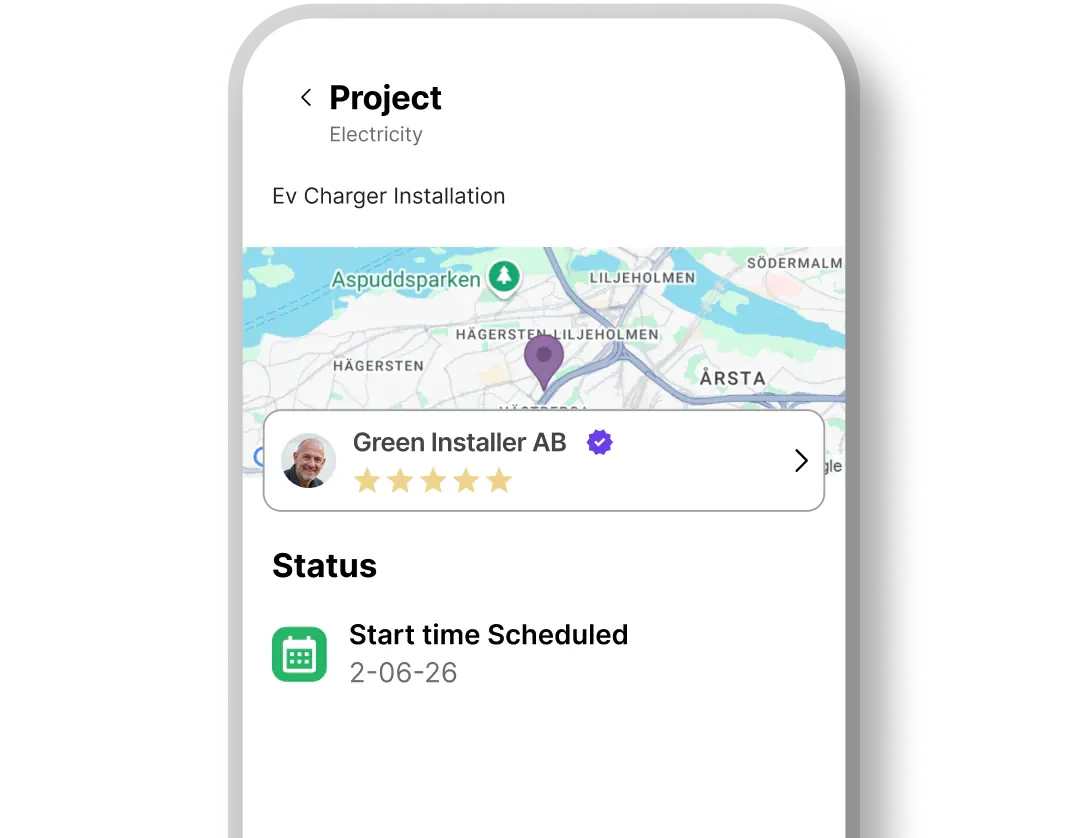
Order, chat, photos, quote, and invoice live on the same job. You check status in Backoffice instead of calling the installer.
One record per job
- • Live status from order to completed installation
- • Installation reports built to your requirements
- • Photos and documents saved on the job
- • Every chat and call logged in one place
It works the same whether the job goes to your own installers, a subcontractor, or the Done network.
How it works
From order to invoice in four steps.
The order comes in
Create orders in Backoffice, or send them automatically from your web shop through the Partner API. The customer is notified right away.
The right installer gets the job
Assign jobs yourself from your installers' calendars, or let Done match on location, availability, and skills. Subcontractors accept the job in the installer app.
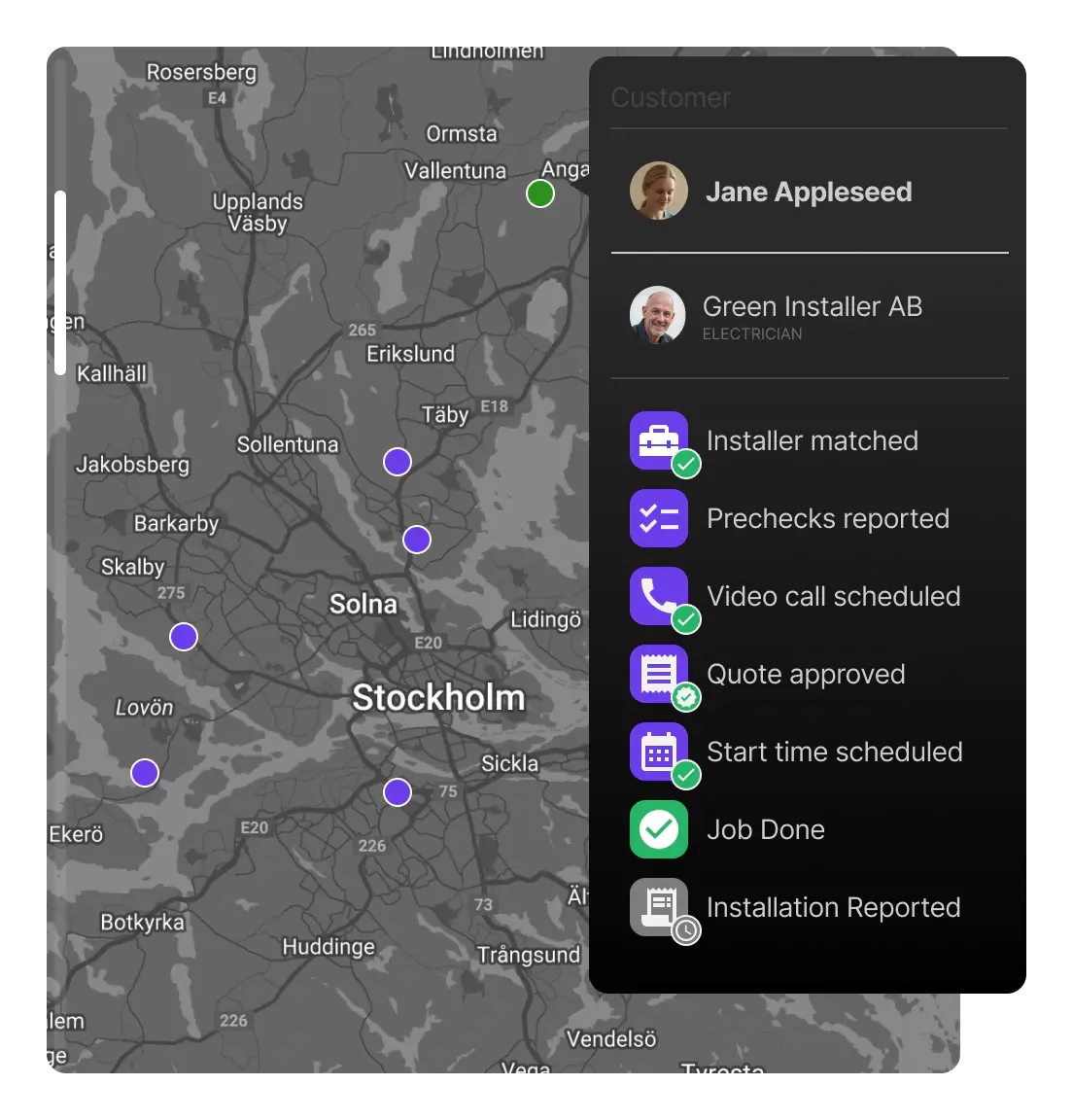
Customer and installer sort out the details
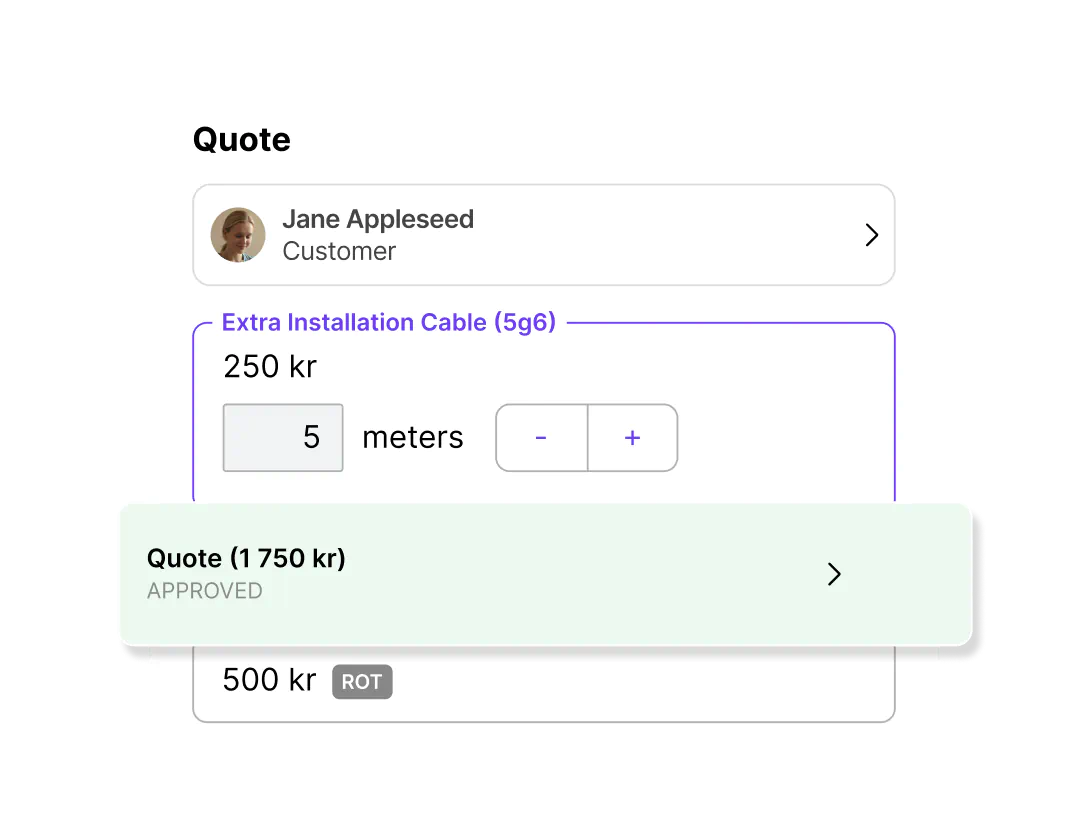
They use chat, photos, and video calls in the app. If the job needs extra work, the installer sends a quote from your price list and the customer approves it there.
Report, rating, invoice
The installer files a report with photos, and the customer rates the job. The invoice is generated automatically, and you check it in Backoffice before it goes out.
What's in the platform
Backoffice for your team, an app for your customers, and an app for your installers, all working from the same job.
'%3e%3cpath%20d='M3.33333%2014.0001C2.96667%2014.0001%202.65278%2013.8695%202.39167%2013.6084C2.13056%2013.3473%202%2013.0334%202%2012.6667V3.33341C2%202.96675%202.13056%202.65286%202.39167%202.39175C2.65278%202.13064%202.96667%202.00008%203.33333%202.00008H6.13333C6.27778%201.60008%206.51944%201.27786%206.85833%201.03341C7.19722%200.78897%207.57778%200.666748%208%200.666748C8.42222%200.666748%208.80278%200.78897%209.14167%201.03341C9.48056%201.27786%209.72222%201.60008%209.86667%202.00008H12.6667C13.0333%202.00008%2013.3472%202.13064%2013.6083%202.39175C13.8694%202.65286%2014%202.96675%2014%203.33341V12.6667C14%2013.0334%2013.8694%2013.3473%2013.6083%2013.6084C13.3472%2013.8695%2013.0333%2014.0001%2012.6667%2014.0001H3.33333ZM3.33333%2012.6667H12.6667V3.33341H3.33333V12.6667ZM4.66667%2011.3334H9.33333V10.0001H4.66667V11.3334ZM4.66667%208.66675H11.3333V7.33341H4.66667V8.66675ZM4.66667%206.00008H11.3333V4.66675H4.66667V6.00008ZM8%202.83341C8.14444%202.83341%208.26389%202.78619%208.35833%202.69175C8.45278%202.5973%208.5%202.47786%208.5%202.33341C8.5%202.18897%208.45278%202.06953%208.35833%201.97508C8.26389%201.88064%208.14444%201.83341%208%201.83341C7.85556%201.83341%207.73611%201.88064%207.64167%201.97508C7.54722%202.06953%207.5%202.18897%207.5%202.33341C7.5%202.47786%207.54722%202.5973%207.64167%202.69175C7.73611%202.78619%207.85556%202.83341%208%202.83341Z'%20fill='black'/%3e%3c/g%3e%3c/svg%3e)
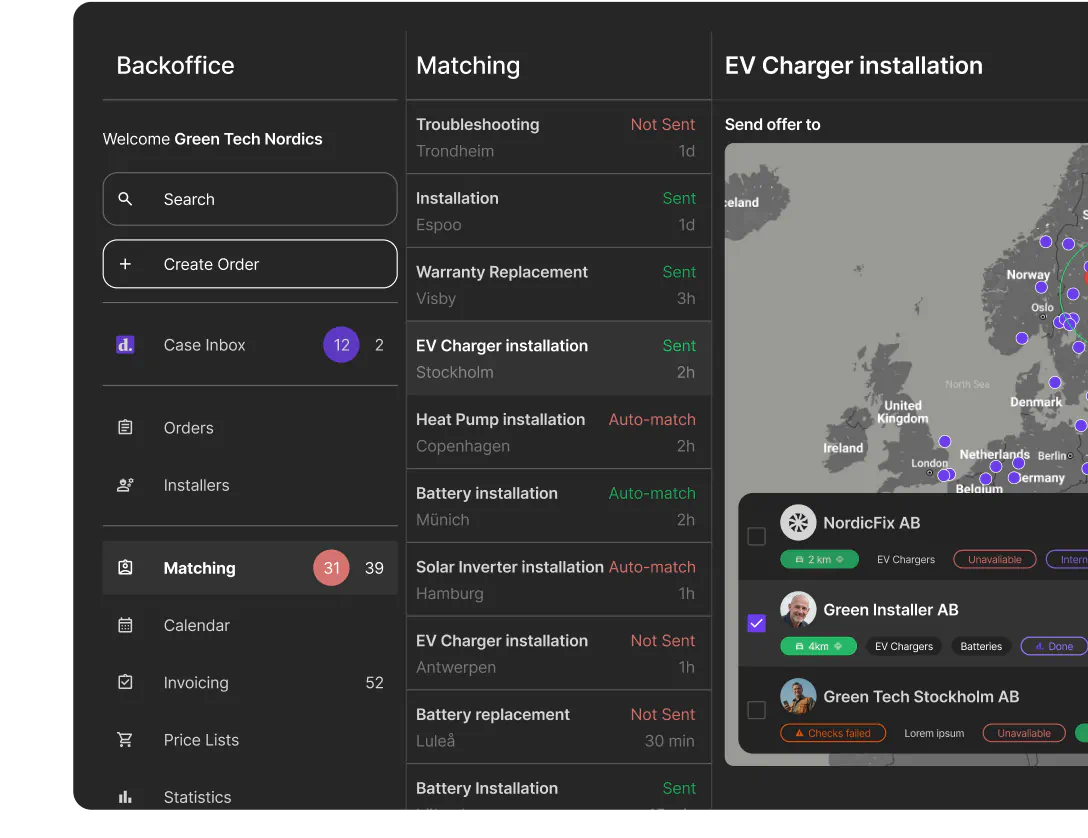
Order Management
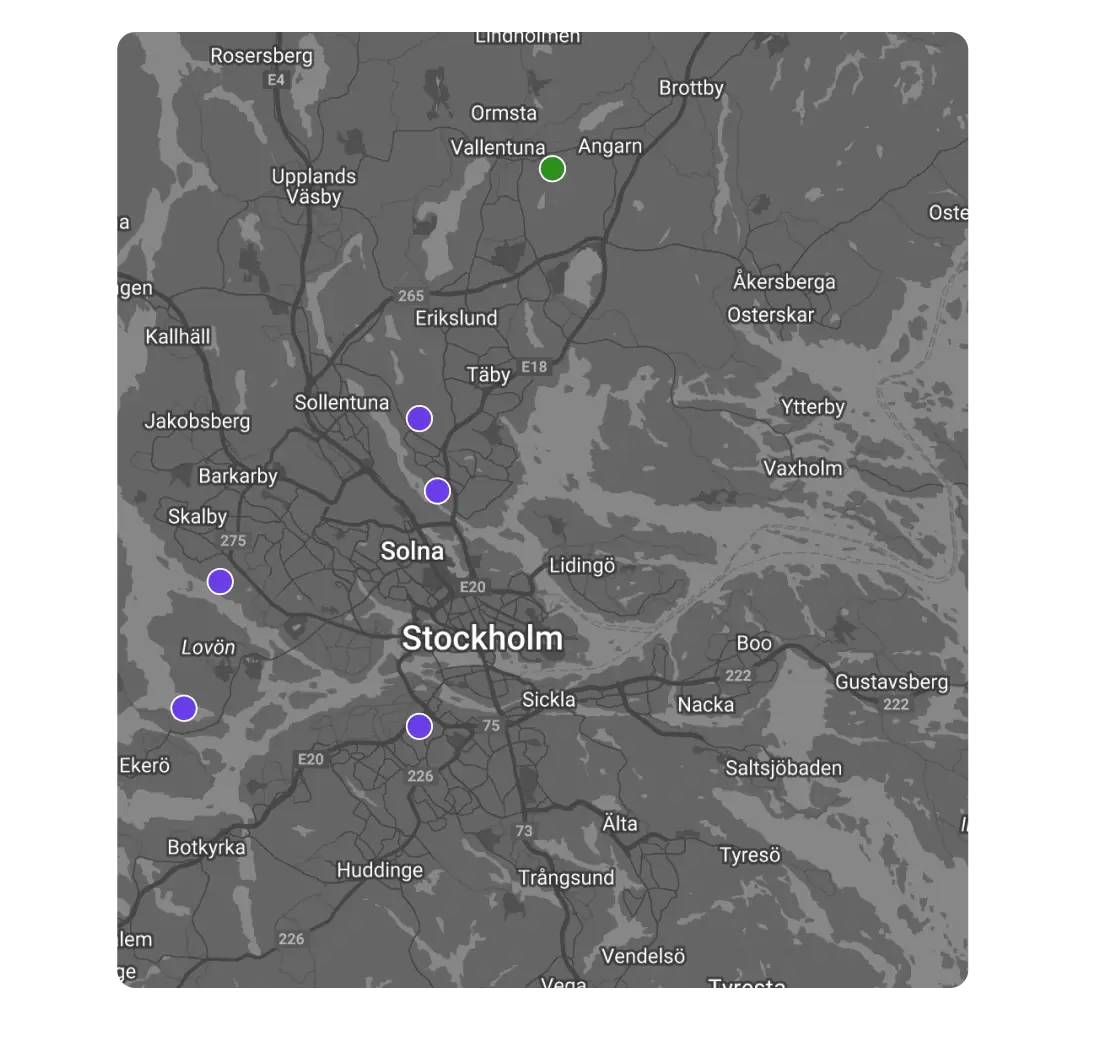
Every installation in Backoffice with its timeline, chats, quotes, and financials. Spot problems on the map, and let Done Inbox flag the jobs that need your attention.
'%3e%3cpath%20d='M3.33333%2012.6667V3.33333%2010.9%209.48333v3.18337Zm0%201.3333c-.36666%200-.68055-.1306-.94166-.3917C2.13056%2013.3472%202%2013.0333%202%2012.6667V3.33333c0-.36666.13056-.68055.39167-.94166C2.65278%202.13056%202.96667%202%203.33333%202h9.33337c.3666%200%20.6805.13056.9416.39167s.3917.575.3917.94166v5.33334h-1.3333V3.33333H3.33333v9.33337H8V14H3.33333Zm8.23337.6667L9.2%2012.3l.95-.9333%201.4167%201.4166L14.4%209.95l.9333.95-3.7666%203.7667ZM5.33333%208.66667c.18889%200%20.34723-.06389.475-.19167C5.93611%208.34722%206%208.18889%206%208s-.06389-.34722-.19167-.475c-.12777-.12778-.28611-.19167-.475-.19167s-.34722.06389-.475.19167c-.12777.12778-.19166.28611-.19166.475s.06389.34722.19166.475c.12778.12778.28611.19167.475.19167Zm0-2.66667c.18889%200%20.34723-.06389.475-.19167C5.93611%205.68056%206%205.52222%206%205.33333s-.06389-.34722-.19167-.475c-.12777-.12777-.28611-.19166-.475-.19166s-.34722.06389-.475.19166c-.12777.12778-.19166.28611-.19166.475s.06389.34723.19166.475c.12778.12778.28611.19167.475.19167Zm2%202.66667h3.99997V7.33333H7.33333v1.33334Zm0-2.66667h3.99997V4.66667H7.33333V6Z'%20fill='%23000'/%3e%3c/g%3e%3c/svg%3e)
Case Management
Done Inbox turns customer messages into tickets tied to the job, with chat history, photos, and order details in the same view.
'%3e%3cpath%20d='M3.33333%2014c-.36666%200-.68055-.1306-.94166-.3917C2.13056%2013.3472%202%2013.0333%202%2012.6666V3.33329c0-.36666.13056-.68055.39167-.94166.26111-.26112.575-.39167.94166-.39167h2.8c.15556-.4.4-.72222.73334-.96667C7.2.788848%207.57778.666626%208%20.666626c.42222%200%20.8.122222%201.13333.366664.33334.24445.57778.56667.73334.96667h2.80003c.3666%200%20.6805.13055.9416.39167.2611.26111.3917.575.3917.94166v9.33331c0%20.3667-.1306.6806-.3917.9417s-.575.3917-.9416.3917H3.33333ZM8%202.83329c.14444%200%20.26389-.04722.35833-.14166.09445-.09445.14167-.21389.14167-.35834%200-.14444-.04722-.26389-.14167-.35833-.09444-.09445-.21389-.14167-.35833-.14167-.14444%200-.26389.04722-.35833.14167-.09445.09444-.14167.21389-.14167.35833%200%20.14445.04722.26389.14167.35834.09444.09444.21389.14166.35833.14166ZM3.33333%2011.9c.6-.5889%201.29723-1.0528%202.09167-1.3917S7.07778%209.99996%208%209.99996c.92222%200%201.78056.16944%202.575.50834.7944.3389%201.4917.8028%202.0917%201.3917V3.33329H3.33333V11.9ZM8%208.66663c.64444%200%201.19445-.22778%201.65-.68334.4556-.45555.6833-1.00555.6833-1.65%200-.64444-.2277-1.19444-.6833-1.65-.45555-.45555-1.00556-.68333-1.65-.68333-.64444%200-1.19444.22778-1.65.68333-.45556.45556-.68333%201.00556-.68333%201.65%200%20.64445.22777%201.19445.68333%201.65.45556.45556%201.00556.68334%201.65.68334ZM4.66667%2012.6666h6.66663V12.5c-.4666-.3889-.9833-.6806-1.54997-.875-.56666-.1945-1.16111-.2917-1.78333-.2917s-1.21667.0972-1.78333.2917c-.56667.1944-1.08334.4861-1.55.875v.1666ZM8%207.33329c-.27778%200-.51389-.09722-.70833-.29166C7.09722%206.84718%207%206.61107%207%206.33329c0-.27778.09722-.51389.29167-.70833.19444-.19445.43055-.29167.70833-.29167s.51389.09722.70833.29167C8.90278%205.8194%209%206.05551%209%206.33329s-.09722.51389-.29167.70834c-.19444.19444-.43055.29166-.70833.29166Z'%20fill='%23000'/%3e%3c/g%3e%3c/svg%3e)
Matching & Scheduling
Plan your own team and subcontractors in one calendar. Assign jobs yourself, or send them out automatically as offers in the installer app, including to the Done network.
'%3e%3cpath%20d='M8.00001%208.00002C7.26667%208.00002%206.63889%207.73891%206.11667%207.21669C5.59445%206.69447%205.33334%206.06669%205.33334%205.33335C5.33334%204.60002%205.59445%203.97224%206.11667%203.45002C6.63889%202.9278%207.26667%202.66669%208.00001%202.66669C8.73334%202.66669%209.36112%202.9278%209.88334%203.45002C10.4056%203.97224%2010.6667%204.60002%2010.6667%205.33335C10.6667%206.06669%2010.4056%206.69447%209.88334%207.21669C9.36112%207.73891%208.73334%208.00002%208.00001%208.00002ZM2.66667%2013.3334V11.4667C2.66667%2011.0889%202.76389%2010.7417%202.95834%2010.425C3.15278%2010.1084%203.41112%209.86669%203.73334%209.70002C4.42223%209.35558%205.12223%209.09724%205.83334%208.92502C6.54445%208.7528%207.26667%208.66669%208.00001%208.66669C8.73334%208.66669%209.45556%208.7528%2010.1667%208.92502C10.8778%209.09724%2011.5778%209.35558%2012.2667%209.70002C12.5889%209.86669%2012.8472%2010.1084%2013.0417%2010.425C13.2361%2010.7417%2013.3333%2011.0889%2013.3333%2011.4667V13.3334H2.66667ZM4.00001%2012H12V11.4667C12%2011.3445%2011.9694%2011.2334%2011.9083%2011.1334C11.8472%2011.0334%2011.7667%2010.9556%2011.6667%2010.9C11.0667%2010.6%2010.4611%2010.375%209.85001%2010.225C9.23889%2010.075%208.62223%2010%208.00001%2010C7.37778%2010%206.76112%2010.075%206.15001%2010.225C5.53889%2010.375%204.93334%2010.6%204.33334%2010.9C4.23334%2010.9556%204.15278%2011.0334%204.09167%2011.1334C4.03056%2011.2334%204.00001%2011.3445%204.00001%2011.4667V12ZM8.00001%206.66669C8.36667%206.66669%208.68056%206.53613%208.94167%206.27502C9.20278%206.01391%209.33334%205.70002%209.33334%205.33335C9.33334%204.96669%209.20278%204.6528%208.94167%204.39169C8.68056%204.13058%208.36667%204.00002%208.00001%204.00002C7.63334%204.00002%207.31945%204.13058%207.05834%204.39169C6.79723%204.6528%206.66667%204.96669%206.66667%205.33335C6.66667%205.70002%206.79723%206.01391%207.05834%206.27502C7.31945%206.53613%207.63334%206.66669%208.00001%206.66669Z'%20fill='black'/%3e%3c/g%3e%3c/svg%3e)
Customer App
Customers follow their installation step by step, chat and video call with the installer, and approve quotes.
'%3e%3cpath%20d='M3.99999%2012.6667H8V12H3.99999V12.6667ZM4.49999%206.66667H7.5C7.63333%206.66667%207.75%206.61667%207.85%206.51667C7.95%206.41667%208%206.3%208%206.16667C8%206.03333%207.95%205.91667%207.85%205.81667C7.75%205.71667%207.63333%205.66667%207.5%205.66667H4.49999C4.36666%205.66667%204.24999%205.71667%204.14999%205.81667C4.04999%205.91667%203.99999%206.03333%203.99999%206.16667C3.99999%206.3%204.04999%206.41667%204.14999%206.51667C4.24999%206.61667%204.36666%206.66667%204.49999%206.66667ZM4.49999%205H7.5C7.63333%205%207.75%204.95%207.85%204.85C7.95%204.75%208%204.63333%208%204.5C8%204.36667%207.95%204.25%207.85%204.15C7.75%204.05%207.63333%204%207.5%204H4.49999C4.36666%204%204.24999%204.05%204.14999%204.15C4.04999%204.25%203.99999%204.36667%203.99999%204.5C3.99999%204.63333%204.04999%204.75%204.14999%204.85C4.24999%204.95%204.36666%205%204.49999%205ZM10.6667%207.33333V6H12V4.66667H10.6667V3.33333H12C12.3667%203.33333%2012.6806%203.46389%2012.9417%203.725C13.2028%203.98611%2013.3333%204.3%2013.3333%204.66667H14.6667C14.8556%204.66667%2015.0139%204.73056%2015.1417%204.85833C15.2694%204.98611%2015.3333%205.14444%2015.3333%205.33333C15.3333%205.52222%2015.2694%205.68056%2015.1417%205.80833C15.0139%205.93611%2014.8556%206%2014.6667%206H13.3333C13.3333%206.36667%2013.2028%206.68056%2012.9417%206.94167C12.6806%207.20278%2012.3667%207.33333%2012%207.33333H10.6667ZM8%2010.6667H6.66666V7.33333H9.33333V3.33333H3.99999C3.63333%203.33333%203.31944%203.46389%203.05833%203.725C2.79722%203.98611%202.66666%204.3%202.66666%204.66667V6C2.66666%206.36667%202.79722%206.68056%203.05833%206.94167C3.31944%207.20278%203.63333%207.33333%203.99999%207.33333H5.33333V10.6667H3.99999V8.66667C3.26666%208.66667%202.63888%208.40556%202.11666%207.88333C1.59444%207.36111%201.33333%206.73333%201.33333%206V4.66667C1.33333%203.93333%201.59444%203.30556%202.11666%202.78333C2.63888%202.26111%203.26666%202%203.99999%202H9.33333C9.7%202%2010.0139%202.13056%2010.275%202.39167C10.5361%202.65278%2010.6667%202.96667%2010.6667%203.33333V7.33333C10.6667%207.7%2010.5361%208.01389%2010.275%208.275C10.0139%208.53611%209.7%208.66667%209.33333%208.66667H8V10.6667ZM3.66666%2014C3.38888%2014%203.15277%2013.9028%202.95833%2013.7083C2.76388%2013.5139%202.66666%2013.2778%202.66666%2013V11.6667C2.66666%2011.3889%202.76388%2011.1528%202.95833%2010.9583C3.15277%2010.7639%203.38888%2010.6667%203.66666%2010.6667H8.33333C8.61111%2010.6667%208.84722%2010.7639%209.04166%2010.9583C9.23611%2011.1528%209.33333%2011.3889%209.33333%2011.6667V13C9.33333%2013.2778%209.23611%2013.5139%209.04166%2013.7083C8.84722%2013.9028%208.61111%2014%208.33333%2014H3.66666Z'%20fill='%23222222'/%3e%3c/g%3e%3c/svg%3e)
Installer App
Job offers, schedule, customer chat, and video calls in one app, with manuals and login credentials attached to every job.
'%3e%3cpath%20d='M7.06667%2010.7001L11.7667%206.00008L10.8333%205.06675L7.06667%208.83341L5.16667%206.93341L4.23333%207.86675L7.06667%2010.7001ZM3.33333%2014.0001C2.96667%2014.0001%202.65278%2013.8695%202.39167%2013.6084C2.13056%2013.3473%202%2013.0334%202%2012.6667V3.33341C2%202.96675%202.13056%202.65286%202.39167%202.39175C2.65278%202.13064%202.96667%202.00008%203.33333%202.00008H6.13333C6.27778%201.60008%206.51944%201.27786%206.85833%201.03341C7.19722%200.78897%207.57778%200.666748%208%200.666748C8.42222%200.666748%208.80278%200.78897%209.14167%201.03341C9.48056%201.27786%209.72222%201.60008%209.86667%202.00008H12.6667C13.0333%202.00008%2013.3472%202.13064%2013.6083%202.39175C13.8694%202.65286%2014%202.96675%2014%203.33341V12.6667C14%2013.0334%2013.8694%2013.3473%2013.6083%2013.6084C13.3472%2013.8695%2013.0333%2014.0001%2012.6667%2014.0001H3.33333ZM3.33333%2012.6667H12.6667V3.33341H3.33333V12.6667ZM8%202.83341C8.14444%202.83341%208.26389%202.78619%208.35833%202.69175C8.45278%202.5973%208.5%202.47786%208.5%202.33341C8.5%202.18897%208.45278%202.06953%208.35833%201.97508C8.26389%201.88064%208.14444%201.83341%208%201.83341C7.85556%201.83341%207.73611%201.88064%207.64167%201.97508C7.54722%202.06953%207.5%202.18897%207.5%202.33341C7.5%202.47786%207.54722%202.5973%207.64167%202.69175C7.73611%202.78619%207.85556%202.83341%208%202.83341Z'%20fill='black'/%3e%3c/g%3e%3c/svg%3e)
Quotes & Invoices
Set up a price list for extra work, and installers quote from it. Approved extras go on the invoice and on to your accounting system.
'%3e%3cpath%20d='M4%2014.6667C3.44444%2014.6667%202.97222%2014.4722%202.58333%2014.0833C2.19444%2013.6944%202%2013.2222%202%2012.6667V10.6667H4V1.33333L5%202.33333L6%201.33333L7%202.33333L8%201.33333L9%202.33333L10%201.33333L11%202.33333L12%201.33333L13%202.33333L14%201.33333V12.6667C14%2013.2222%2013.8056%2013.6944%2013.4167%2014.0833C13.0278%2014.4722%2012.5556%2014.6667%2012%2014.6667H4ZM12%2013.3333C12.1889%2013.3333%2012.3472%2013.2694%2012.475%2013.1417C12.6028%2013.0139%2012.6667%2012.8555%2012.6667%2012.6667V3.33333H5.33333V10.6667H11.3333V12.6667C11.3333%2012.8555%2011.3972%2013.0139%2011.525%2013.1417C11.6528%2013.2694%2011.8111%2013.3333%2012%2013.3333ZM6%205.99999V4.66666H10V5.99999H6ZM6%207.99999V6.66666H10V7.99999H6ZM11.3333%205.99999C11.1444%205.99999%2010.9861%205.93611%2010.8583%205.80833C10.7306%205.68055%2010.6667%205.52222%2010.6667%205.33333C10.6667%205.14444%2010.7306%204.98611%2010.8583%204.85833C10.9861%204.73055%2011.1444%204.66666%2011.3333%204.66666C11.5222%204.66666%2011.6806%204.73055%2011.8083%204.85833C11.9361%204.98611%2012%205.14444%2012%205.33333C12%205.52222%2011.9361%205.68055%2011.8083%205.80833C11.6806%205.93611%2011.5222%205.99999%2011.3333%205.99999ZM11.3333%207.99999C11.1444%207.99999%2010.9861%207.93611%2010.8583%207.80833C10.7306%207.68055%2010.6667%207.52222%2010.6667%207.33333C10.6667%207.14444%2010.7306%206.98611%2010.8583%206.85833C10.9861%206.73055%2011.1444%206.66666%2011.3333%206.66666C11.5222%206.66666%2011.6806%206.73055%2011.8083%206.85833C11.9361%206.98611%2012%207.14444%2012%207.33333C12%207.52222%2011.9361%207.68055%2011.8083%207.80833C11.6806%207.93611%2011.5222%207.99999%2011.3333%207.99999ZM4%2013.3333H10V12H3.33333V12.6667C3.33333%2012.8555%203.39722%2013.0139%203.525%2013.1417C3.65278%2013.2694%203.81111%2013.3333%204%2013.3333Z'%20fill='%23222222'/%3e%3c/g%3e%3c/svg%3e)
Pre-checks and installation reports
Customers photograph the fuse box and installation spot before anyone drives out. After the job, the installer files a report in the format you set.
'%3e%3cpath%20d='M2%2013.3334v-1.3333h1.83333l-.26666-.2334c-.57778-.5111-.98334-1.0944-1.21667-1.75C2.11667%209.36119%202%208.70008%202%208.03341c0-1.23333.36944-2.33055%201.10833-3.29166C3.84722%203.78064%204.81111%203.14453%206%202.83341v1.4c-.8.28889-1.44444.78056-1.93333%201.475-.48889.69445-.73334%201.46945-.73334%202.325%200%20.5.09445.98612.28334%201.45834.18889.47222.48333.90835.88333%201.30835l.16667.1666V9.33342H6v3.99998H2Zm11.95-5.99998H12.6c-.0556-.38889-.175-.76112-.3583-1.11667-.1834-.35556-.4306-.69445-.7417-1.01667l-.1667-.16667v1.63334H10v-4h4v1.33333h-1.8333l.2666.23333c.4556.46667.8056.96112%201.05%201.48334.2445.52222.4%201.06111.4667%201.61667Zm-2.6167%207.99998-.2-1c-.1333-.0555-.2583-.1139-.375-.175-.1166-.0611-.2361-.1361-.3583-.225l-.96667.3-.66666-1.1333.76666-.6667c-.02222-.1555-.03333-.3-.03333-.4333%200-.1334.01111-.2778.03333-.4334l-.76666-.6666.66666-1.13335.96667.29995c.1222-.08884.2417-.16384.3583-.22495.1167-.06111.2417-.11945.375-.175l.2-1h1.3334l.2%201c.1333.05555.2583.11667.375.18333.1166.06667.2361.15002.3583.25002l.9667-.33335.6666%201.16665-.7666.6667c.0222.1333.0333.2722.0333.4166%200%20.1445-.0111.2834-.0333.4167l.7666.6667-.6666%201.1333-.9667-.3c-.1222.0889-.2417.1639-.3583.225-.1167.0611-.2417.1195-.375.175l-.2%201h-1.3334Zm.6667-2c.3667%200%20.6806-.1305.9417-.3917.2611-.2611.3916-.575.3916-.9416%200-.3667-.1305-.6806-.3916-.9417s-.575-.3917-.9417-.3917-.6806.1306-.9417.3917-.3916.575-.3916.9417c0%20.3666.1305.6805.3916.9416.2611.2612.575.3917.9417.3917Z'%20fill='%23000'/%3e%3c/g%3e%3c/svg%3e)
SLAs and automatic follow-up
Set time limits for each step. If a booking stalls or an installer doesn't reply, Done follows up or escalates automatically.
Works with the systems you already use
Done connects to your e-commerce, accounting, and CRM systems, so nobody has to type an order twice.
 Shopify
 WooCommerce
 HubSpot
 Microsoft Dynamics 365
 Stripe
 ZapierShopifyWooCommerceHubSpotMicrosoft Dynamics 365StripeZapierShopifyWooCommerceHubSpotMicrosoft Dynamics 365StripeZapier
 Google BigQuery
 QuickBooks
 Xero
Xero BigCommerce
 Zoho
Zoho Mailchimp
 SAP
SAP Webflow
 DrupalGoogle BigQueryQuickBooksXeroBigCommerceZohoMailchimpSAPWebflowDrupalGoogle BigQueryQuickBooksXeroBigCommerceZohoMailchimpSAPWebflowDrupal
Shopify
Orders come in from your web shop, and status updates go back to it.
Fortnox
Invoices go straight to Fortnox and other accounting systems.
Zapier
Zapier, webhooks, and the Partner API connect everything else.

Support that knows installations
Your questions go to a team that has handled thousands of installations and knows the platform in detail. You reach them in the chat.
Each part of the platform in detail
What our customers say

“Done has become essential to how we manage and deliver EV charger and battery installations. Their platform makes it easy to coordinate our own partner installers while seamlessly using Done's vetted network when needed. It's reduced our admin work significantly and helped us deliver a smoother, more professional customer experience.”

Filip Sernhede
CEO, Elbilsvaruhuset.se
See how Done would run your installations
Tell us what you sell, in what volumes, and where. We'll show you how those installations would run on Done.
Contact sales